
MEMBERSHIP PAGE Login Guide
My Page
My Page Menu
-
Member Information Inquiry
- You can check your registered address and other customer information.
- Please make changes to your registration details here.
- [OFFICIAL MEMBERSHIP only] Check the serial code and usage status of benefit tickets (discount ticket coupons or invitation tickets applicable to all ticket types)
- Owned Tickets
- Match Viewing History
- Notice
For SOCIO Members
Ticket resale and transfer can be processed through Ticket FC Tokyo. For instructions on how to list tickets for official resale and how to transfer tickets to acquaintances, please refer to the guide below.
Notes
The information you have registered with your J.League ID will also be the registration details for SOCIO and OFFICIAL MEMBERSHIP. When you update your J.League ID registration information, the registration details for SOCIO and OFFICIAL MEMBERSHIP will also be updated automatically.
Please log in with the J.League ID you used to apply for SOCIO and OFFICIAL MEMBERSHIP.
About the Use of OFFICIAL MEMBERSHIP Discount Coupons
- Discount coupon codes will be available for use starting from the advance sale for members.
- The target match will be an FC Tokyo home game.
- You can use one discount coupon code per transaction.
- If you want to cancel the applied discount coupon code, you need to stop the purchase process once and start over from the ticket selection.
- The discount coupon code for your application cannot be reissued.
- The matches eligible for the discount coupon code that you have applied for cannot be changed.
- After applying the discount coupon code, you cannot add another ticket to the cart. If you want to add another ticket, you need to cancel the purchase process and start over from the ticket selection.
- Discount coupons apply only to the ticket price, so various fees are not included.
- All ticket types are eligible for the invitation ticket, which will apply to the highest-priced ticket at the time of payment.
- When changing the reserved seat, the ticket fee payment will be the "amount for the new seat after the change" minus the "amount paid at the time of arranging the initially reserved seat." If you change the reserved seat using membership benefits such as ticket discount coupons or invitation tickets applicable to all ticket types, please note that the "amount paid at the time of arranging the initially reserved seat" does not include the discount amount, so the discount will not be deducted from the amount for the new seat after the change.
By using the discount coupon code listed on your My Page when purchasing match tickets at Ticket FC Tokyo, the applicable amount will be discounted (or you will be invited) accordingly.
Member Events
We are recruiting participants for the following events during home games for all members.
The subjects of each event are as follows.
| Member Events | Target |
|---|---|
| SOCIO Flag Bearer | SOCIO |
| Fair Play Flag Bearer | OFFICIAL MEMBERSHIP |
| Pitch Practice Observation | OFFICIAL MEMBERSHIP |
| Hand in Hand | OFFICIAL MEMBERSHIP (Elementary School and Below) |
| Invitation to Back Center Reserved Seats | OFFICIAL MEMBERSHIP |
Member Utilization Guide
How to Purchase Tickets SOCIO/OFFICIAL MEMBERSHIP
SOCIO and OFFICIAL MEMBERSHIP holders can purchase tickets at member prices before the general ticket sales date.
For how to purchase tickets at member prices, please see the Easy Purchase Guide.
Annual Ticket Usage Guide SOCIO
SOCIO members can use the SOCIO seat change service, resale, transfer/distribution procedures from their My Page.
Seat Change
Change to another seat of the same type or upgrade/downgrade to a different seat type
A fee amount for each match is set for the annual ticket, and using that fee amount, it will be a service that allows you to purchase a different seat for each match.
You can change to other seats of the same type or upgrade/downgrade to a different seat type according to your viewing style for each match (such as when watching with acquaintances or friends).
Additionally, you can also purchase tickets for your companions at the same time when making changes.
* For home games held at Japan National Stadium, only home free seating SOCIO members are scheduled to participate in the "0 Yen Seat Acquisition" program, but tickets acquired through the 0 Yen acquisition cannot use the seat change service.
Seat Change Service Schedule
| Service Start Date and Time | From the start date and time of advance ticket sales for each match |
|---|---|
| Service End Date and Time | Until the SOCIO gate opens on the day of each match |
Rights fee per match
Member Prices for Each Match
* Please check the ticket sales details for each match for member prices.
How to Change
-
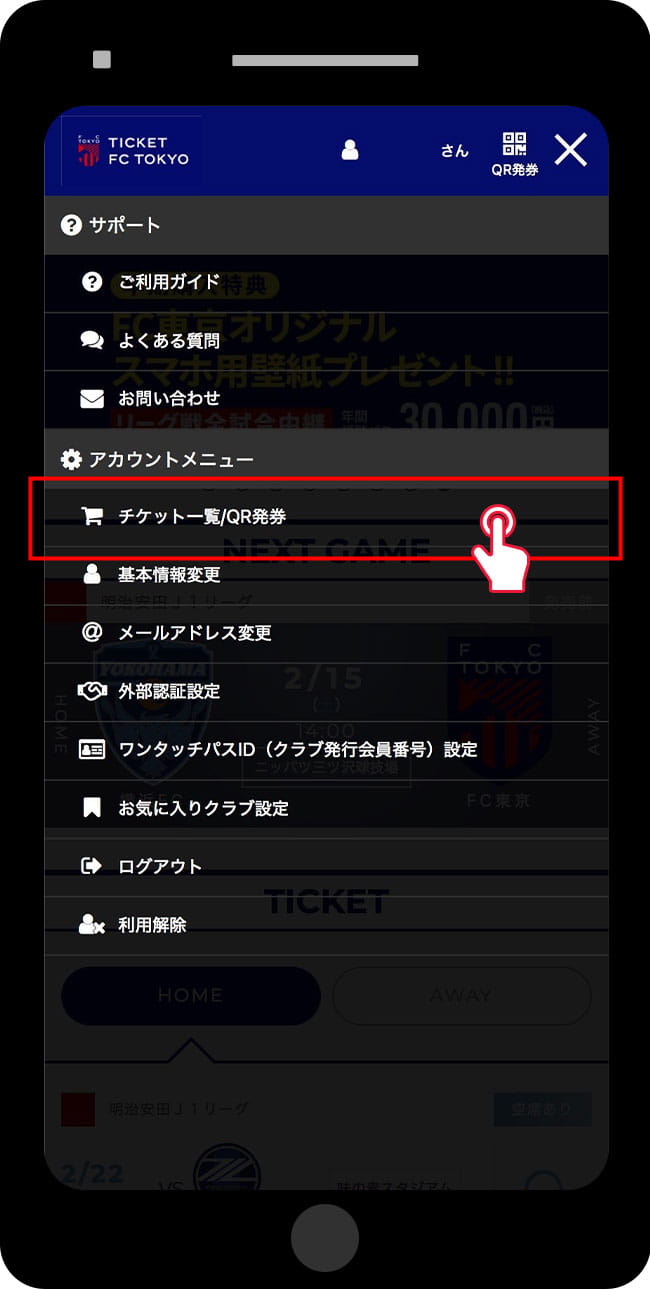
Access Ticket List/QR Ticket Issuance Page
-
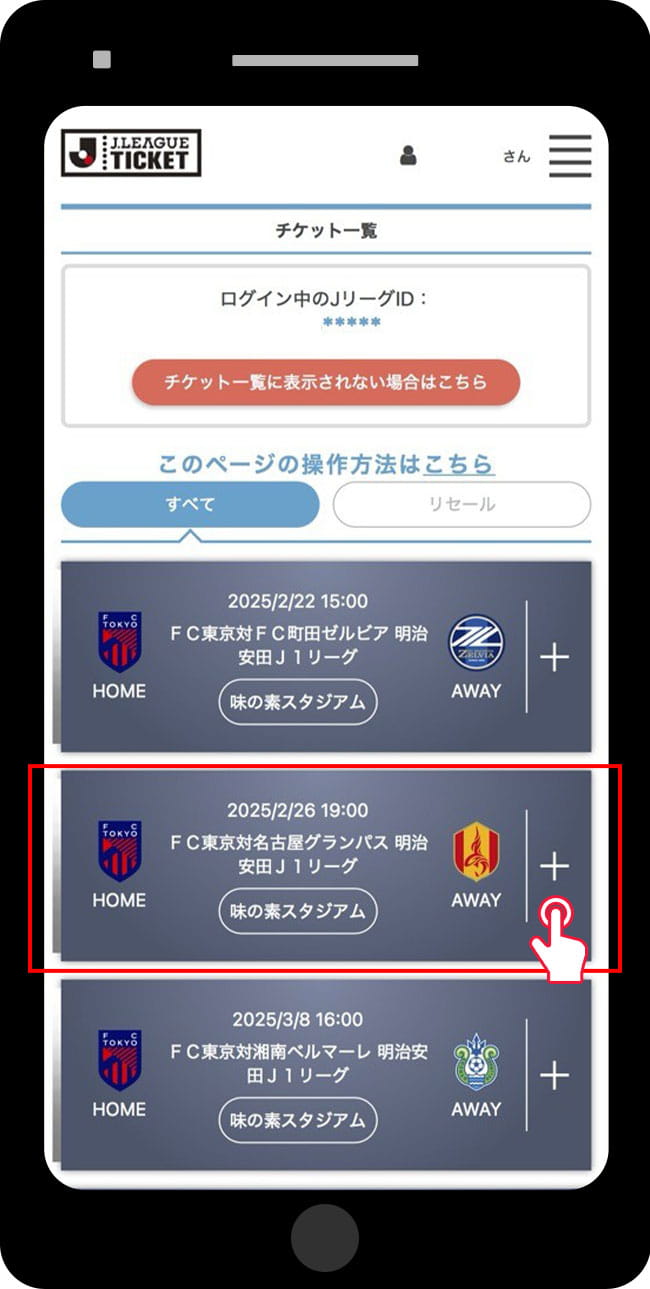
Select the match to change seats
-
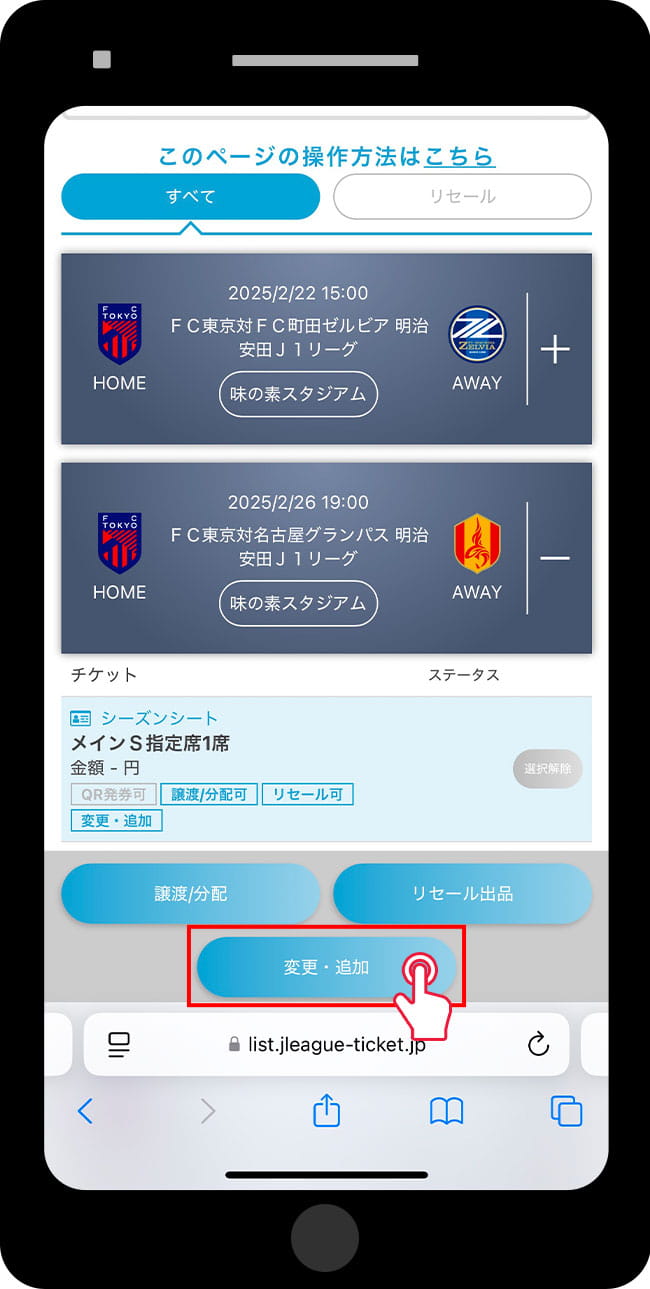
Select Change/Add
-
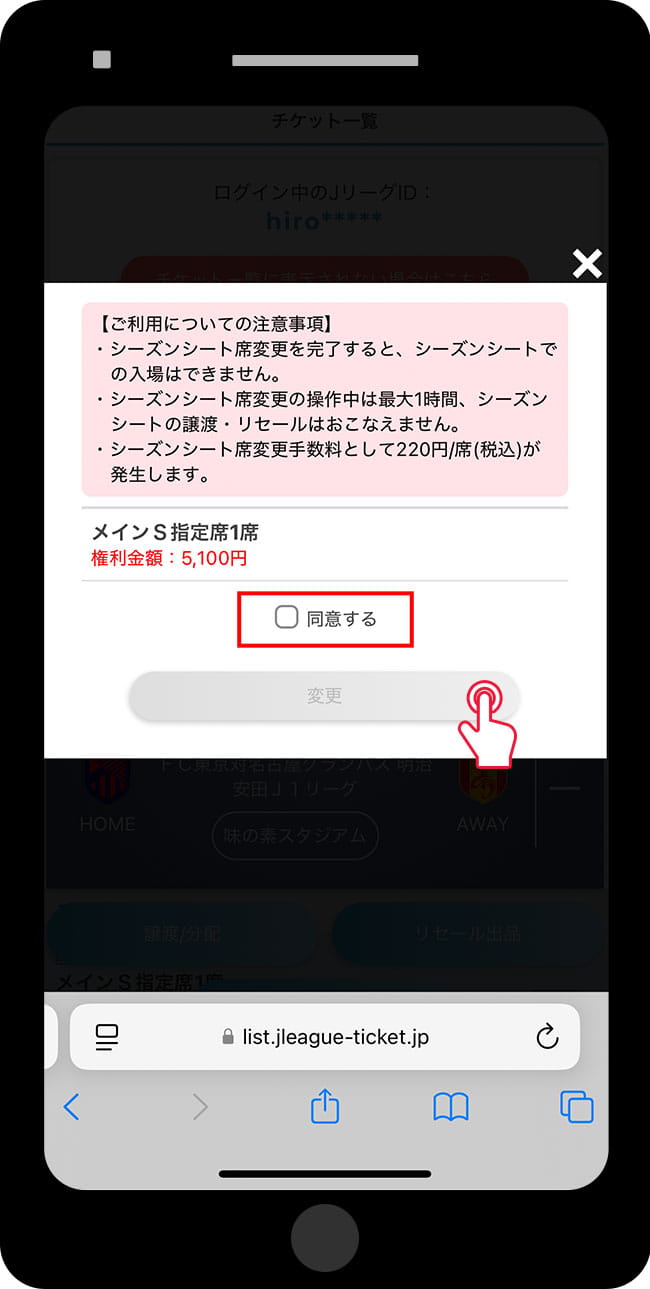
Notes - Annual Ticket Information - Check Rights Amount - Agree and Select 'Change'
-
Select the new seat
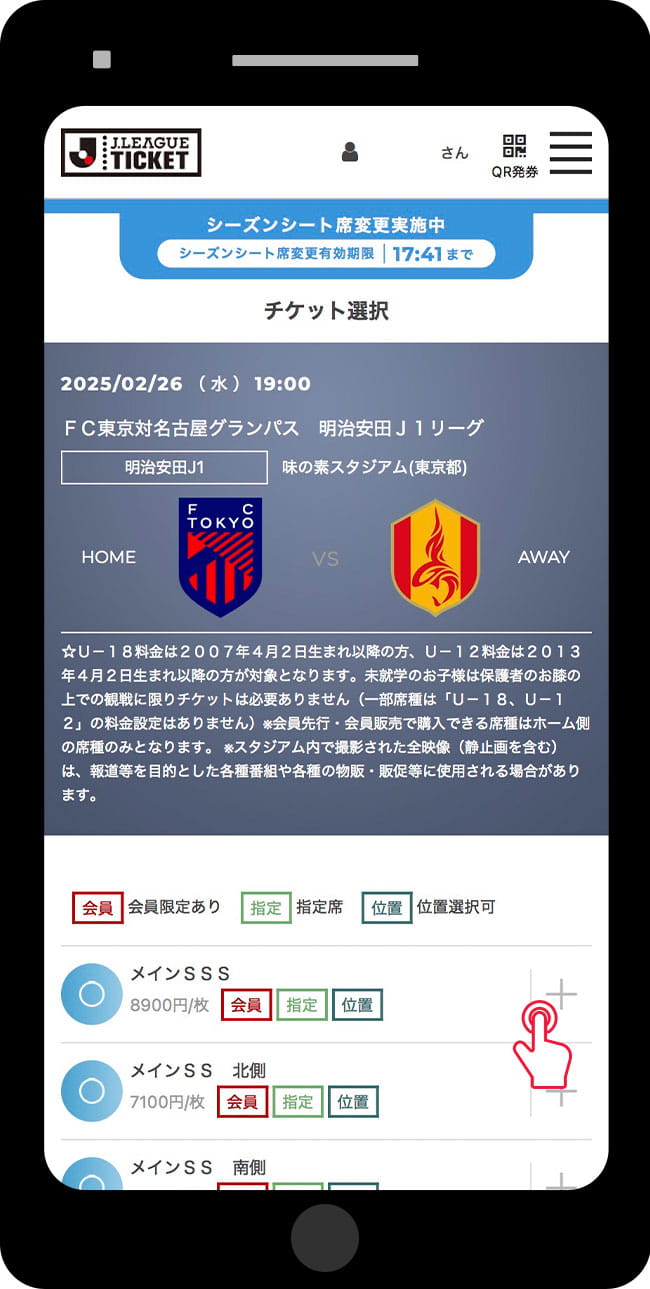
* "Season seat change in progress" will be displayed at the top.
-
Confirmation of Changes
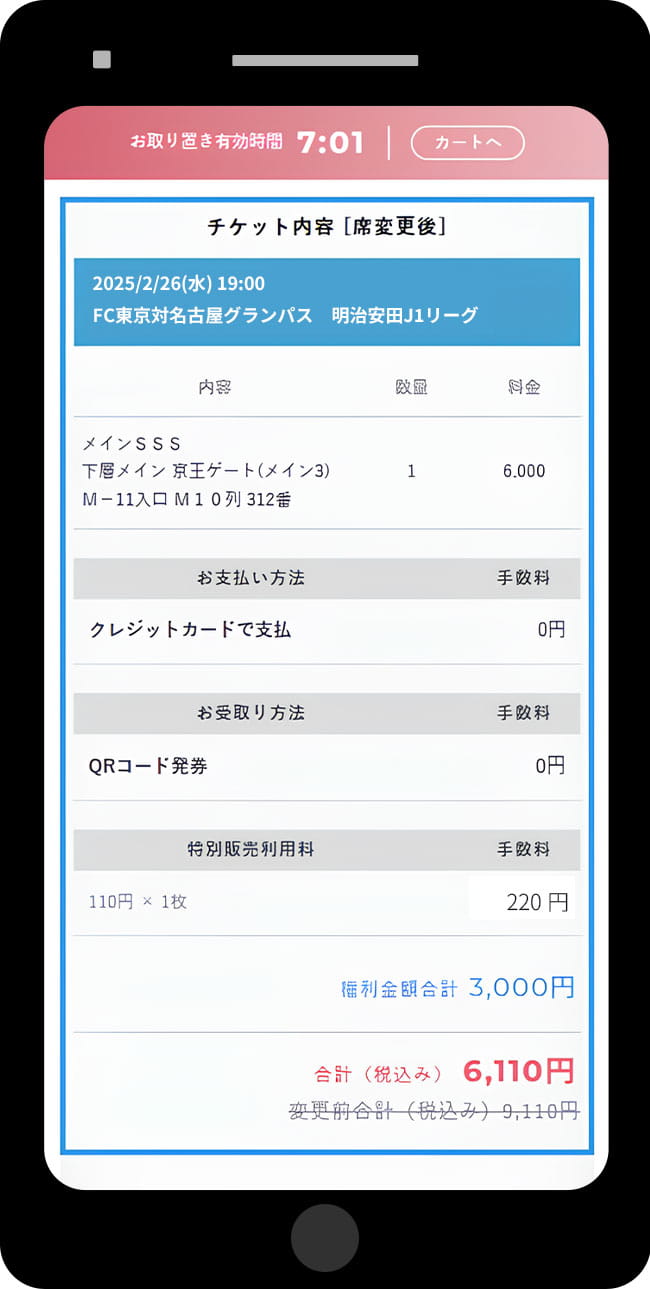
* The total amount including fees will be displayed.
-
Once the modified annual ticket is grayed out and displayed as 'Seat Changed', the procedure is complete
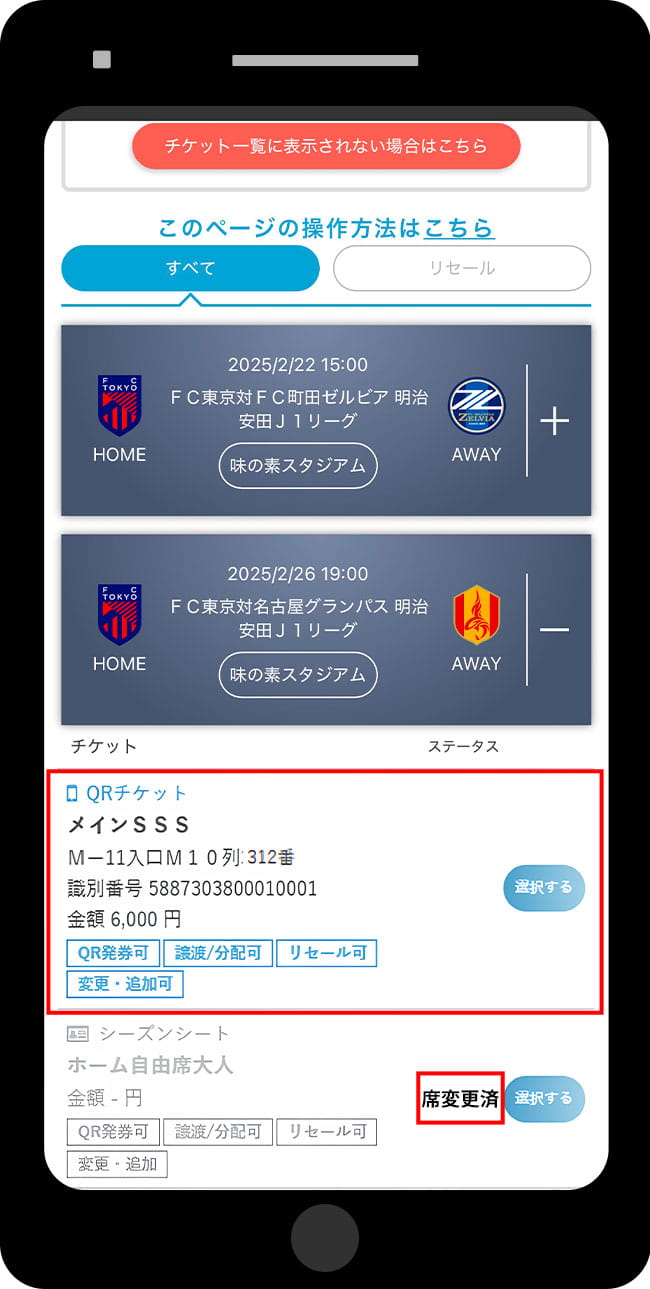


Important Notes *Please be sure to read
- To use this service, you need to link your J League ID and One Touch Pass ID (SOCIO number).
- After the service is established, you will not be able to use your original annual ticket seat.
- Once the service is established, cancellations of transactions are not possible (you cannot return to the original seats).
- A fee of 220 yen (including tax) will be charged per seat for changes or purchases. The rights amount does not apply to the fee.
- In the case of a downgrade, there will be no refund of the difference. Even for a downgrade, the right amount does not apply to the fee, so a fee of 220 yen (including tax) will be incurred.
- You cannot change to a sold-out seat type when using the seat change service.
- Depending on the type of planned ticket, there may be some services that cannot be used.
- This will be held at home games at Ajinomoto Stadium.
- For home games held at the Japan National Stadium, SOCIO members with home free seating are expected to implement the "0 yen seat acquisition"; however, tickets obtained after the 0 yen acquisition cannot use the seat change service.
Resale
Sell tickets for matches you cannot attend
If you use resale, you can make good use of matches you can't attend!
With a season ticket, you can sell tickets for games you cannot attend to customers who want to watch, making it efficient and worry-free♪
Resale Service Schedule
| Service Start Date and Time | From the start date and time of advance ticket sales for each match |
|---|---|
| Service End Date and Time | Until the SOCIO gate opens on the day of each match |
* If the resale is not completed by the service end date and time, the ticket rights will return to the seller.
Listing Price
The listing price varies depending on the match, seat type, and ticket category.
The listing price range will be displayed on the "4. Set Selling Price" screen in the resale listing method below.
About Fees (For Sellers)
The following fees will be deducted from the resale amount, and the balance will be transferred to the specified account.
- Resale Application Fee: 10% of the Final Amount
- Remittance Service Fee: 330 yen (tax included)
How to List
-
Access Ticket List/QR Ticket Issuance Page
-
Select the match/ticket to resell
-
Click to Resell
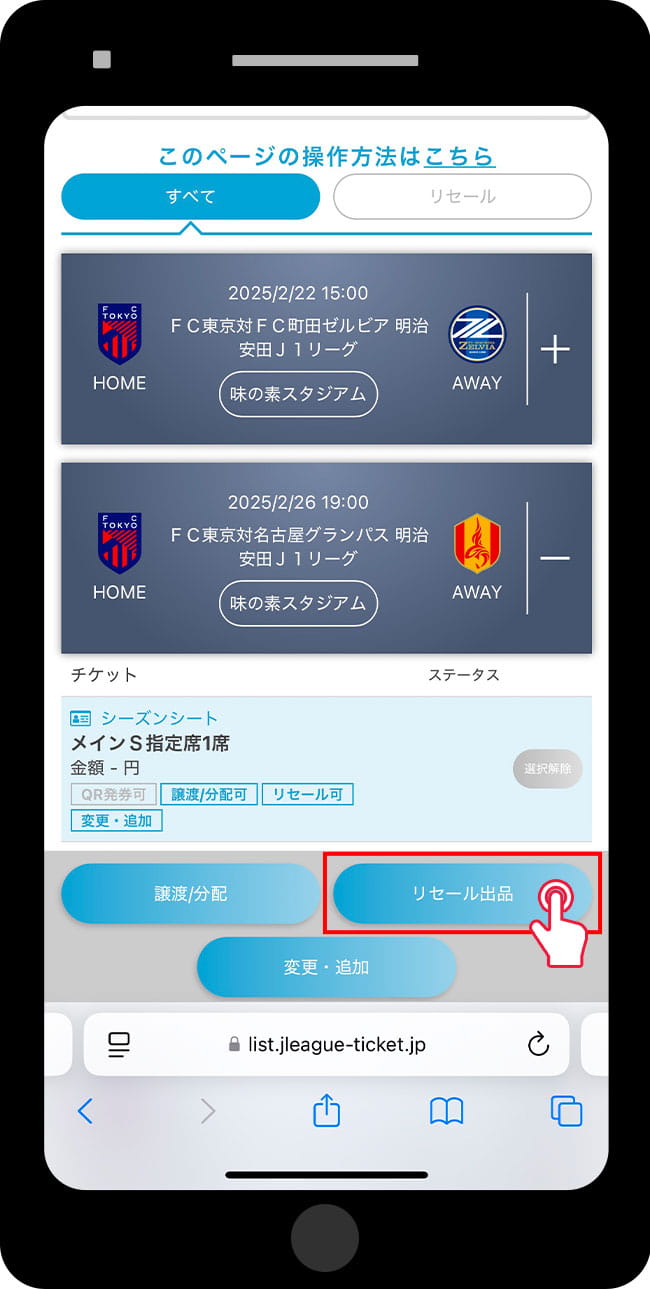
-
Notes - Annual Ticket Information - Check Rights Amount - Agree and Select 'Change'
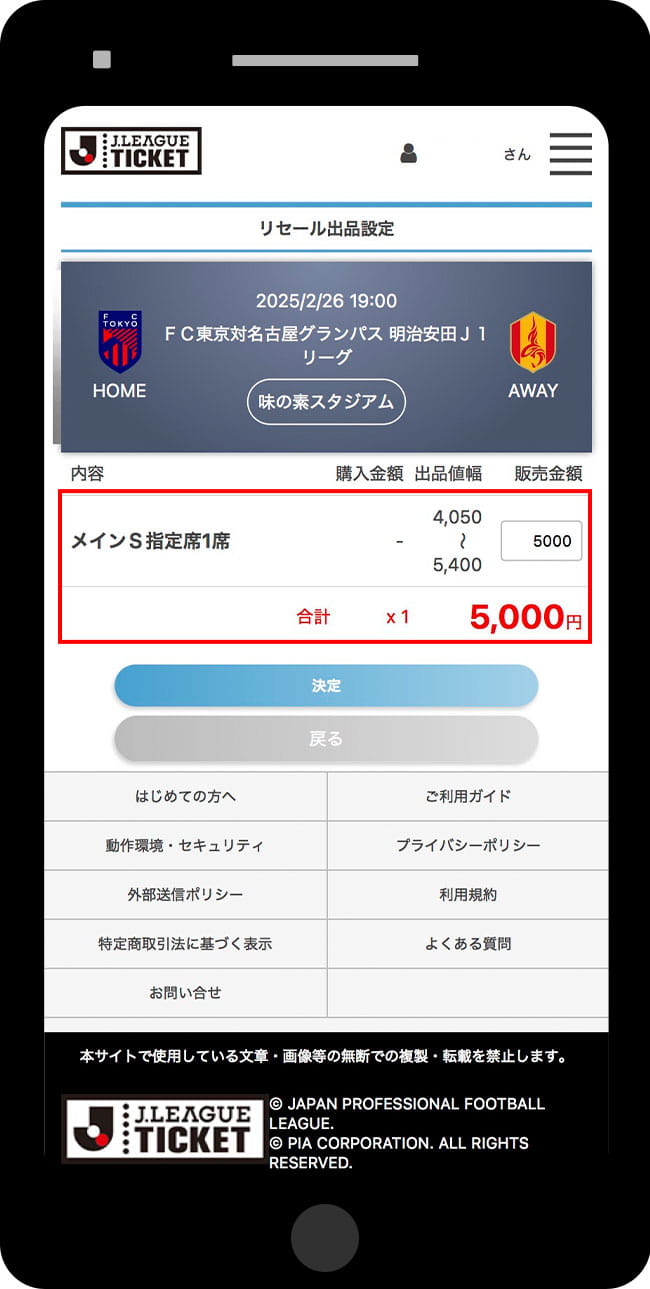
-
Select the new seat
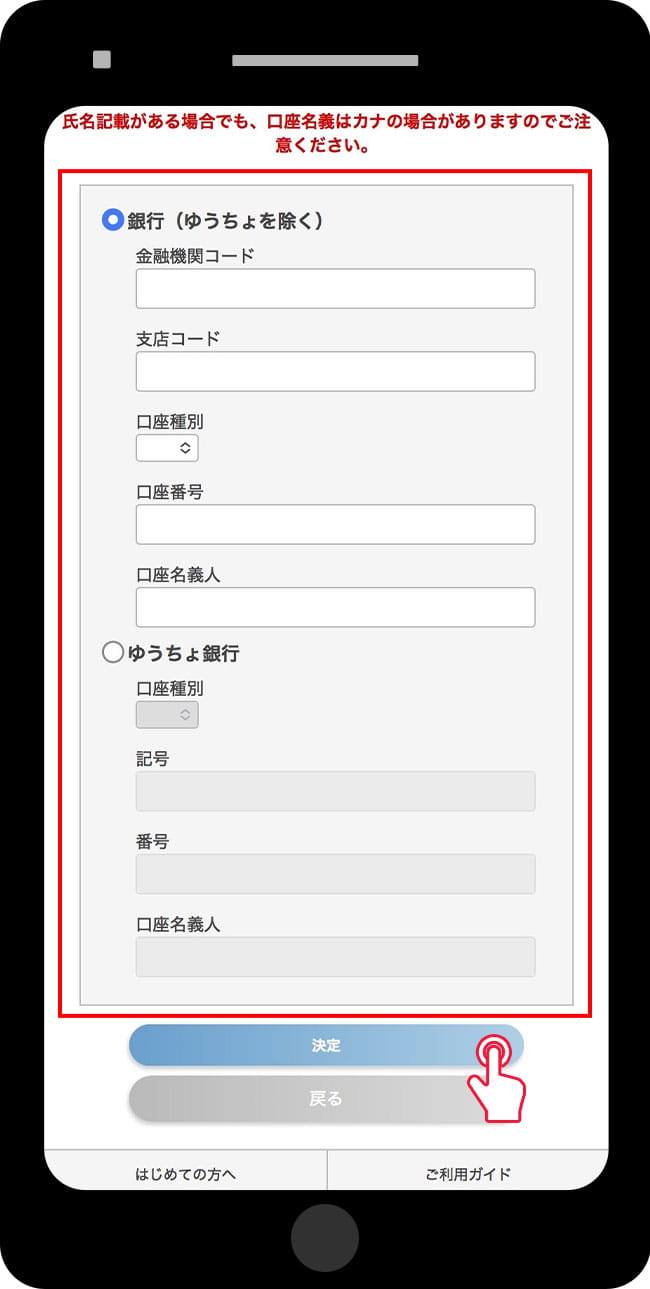
-
Confirmation of Changes
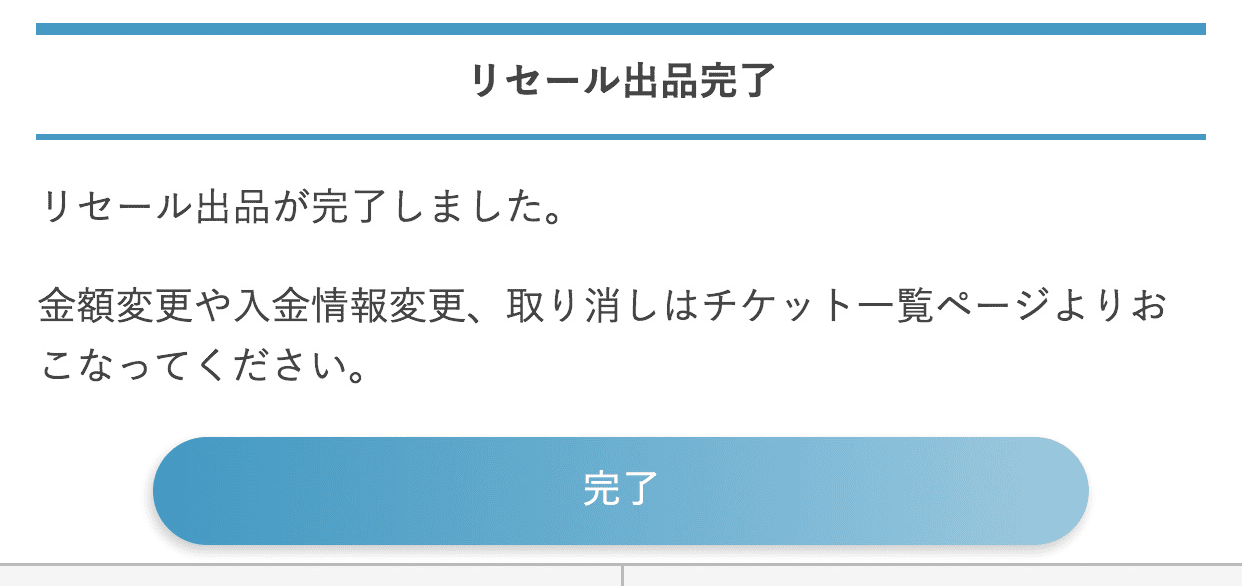
Tickets currently listed for sale are displayed like this. If the resale has not been completed, you can cancel the listing by clicking the "Cancel Resale" button.
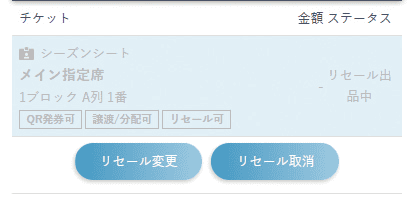


Important Notes *Please be sure to read
- We do not guarantee that it will definitely be established. If it is not established, you may use it yourself.
- After the establishment is completed, it may take some time until the deposit is made.
Transfer/Distribution
Transfer/Distribute Tickets Using the "Ticket Transfer Service"
Tickets for matches you cannot attend can be transferred to your family or acquaintances.
Transfer/Distribution Service Schedule
| Service Start Date and Time | From the start date and time of advance ticket sales for each match |
|---|---|
| Service End Date and Time | Until the SOCIO gate opens on the day of each match |
Transfer/Distribution Method
-
Access Ticket List/QR Ticket Issuance Page
-
Select the match/ticket to resell
-
Click Transfer/Distribution
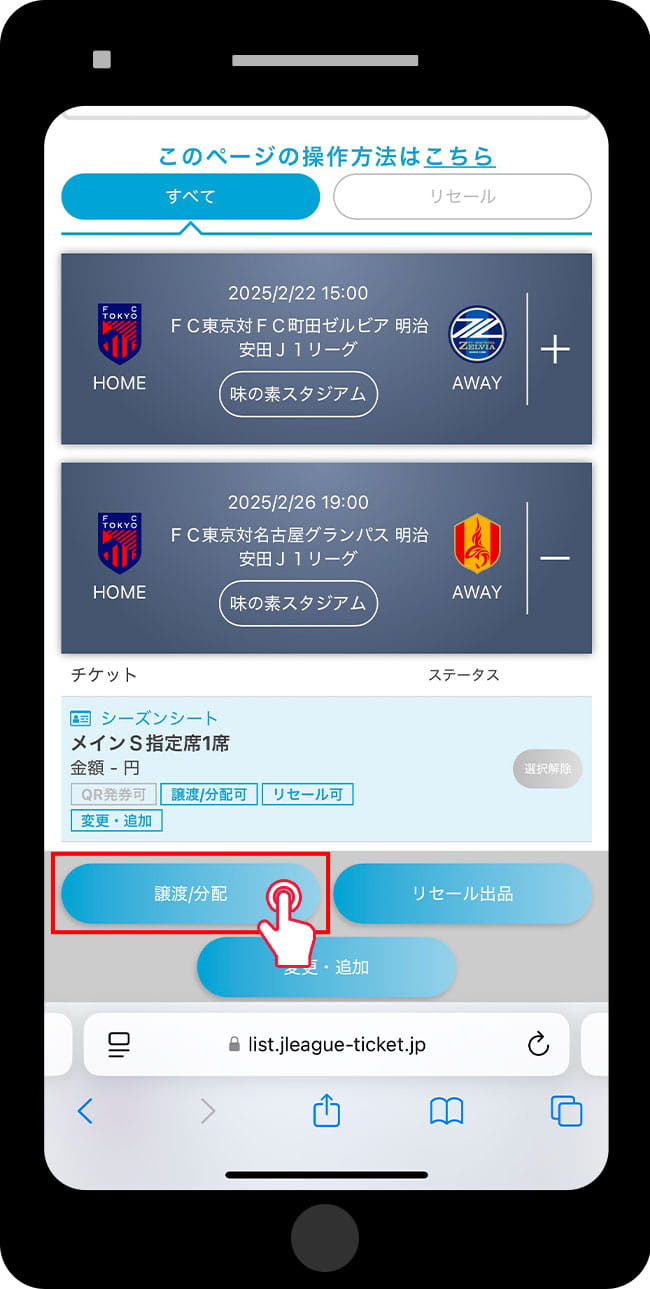
-
Select transfer/distribution method
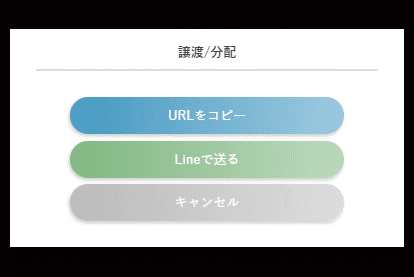
-
Copy URL
- Copy the URL and send it by email or other means to the person you are transferring to.
-
Send via LINE
- Please select the account to transfer from and send a message.
-
Copy URL
-
The person who received the transfer should access the provided URL to issue the QR ticket.
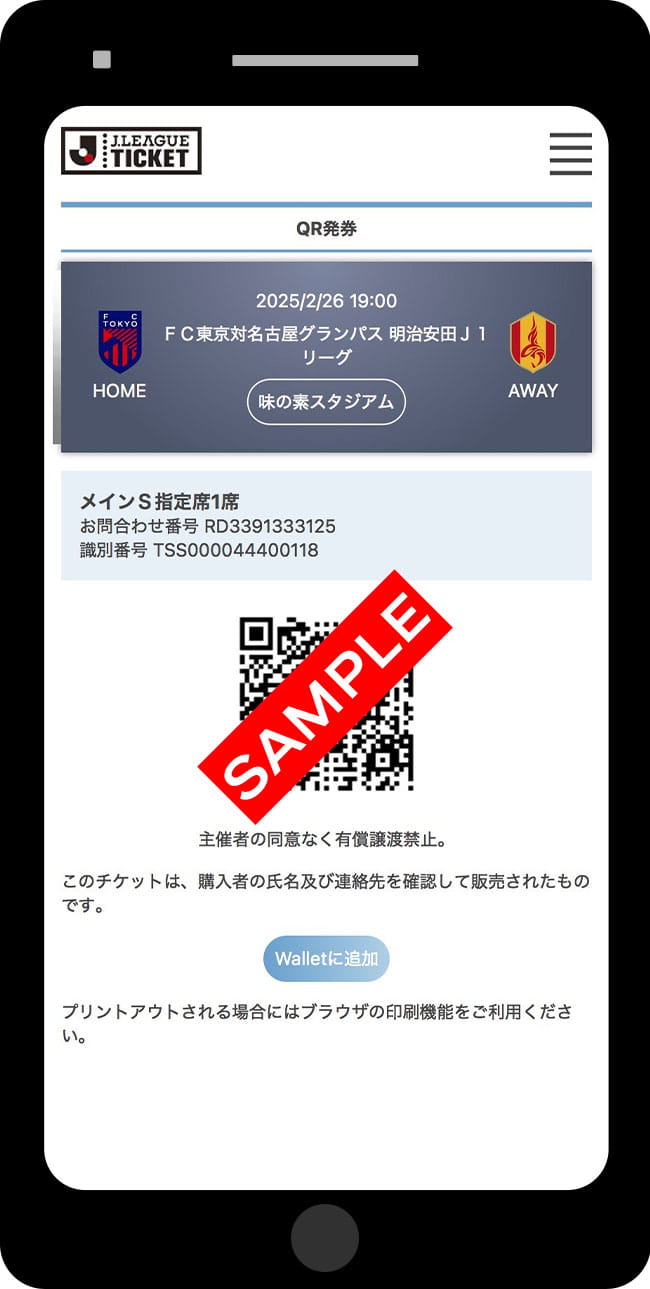
You can enter directly with a QR code!


Important Notes *Please be sure to read
- If you are transferring multiple seats at the same time, please press the "Select" button for each seat, and then proceed to "Transfer/Distribute."
- The ticket transfer process is your own responsibility. The club will not be liable for any damages incurred to you or the transferee if the ticket is not transferred correctly due to an operational error.
- If the ticket transfer is not completed successfully, entry will not be allowed.
- We strictly prohibit transfer or misuse for commercial purposes. If any misuse is confirmed from attendance history, we may suspend usage or request that you refrain from future purchases.
- If you enter with a transferred ticket, your viewing history will not be recorded.
Benefit Ticket
OFFICIAL MEMBERSHIP
By using the discount coupon code listed on My Page when purchasing tickets for FC Tokyo, the applicable amount will be discounted (or complimentary).
How to Use Benefit Tickets
-
Access the FC Tokyo (J League Ticket) and select the match you want to watch.
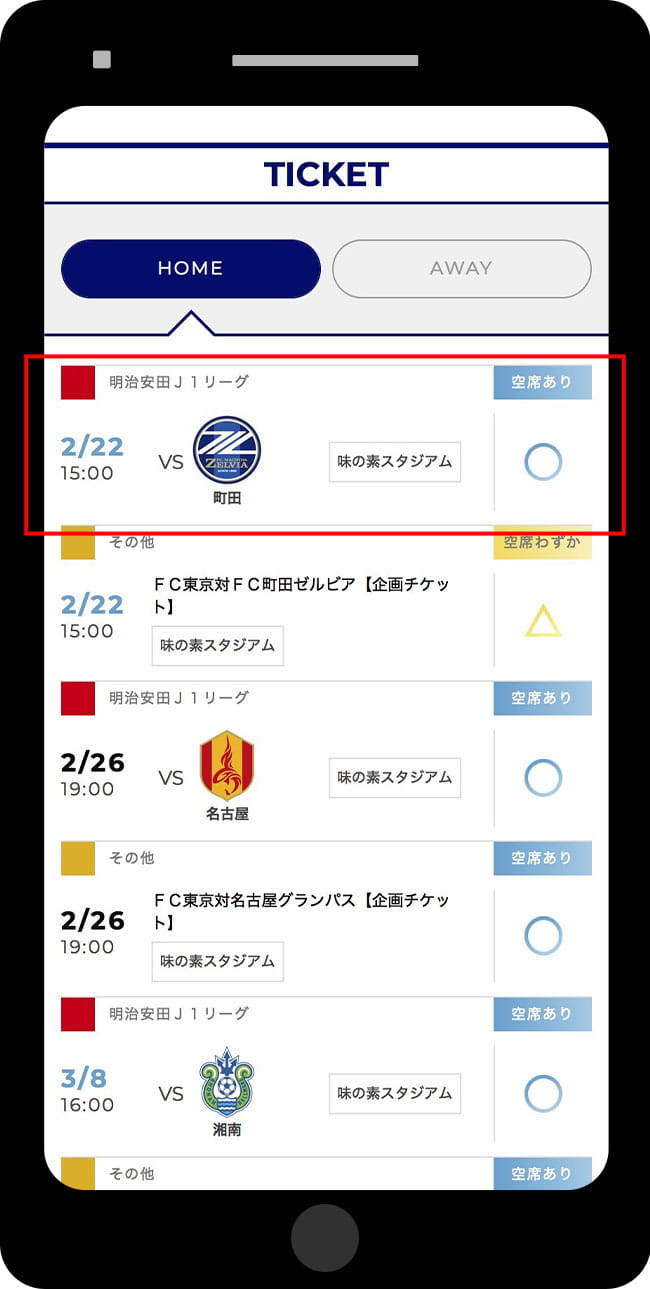
* Only matches on sale are displayed.
-
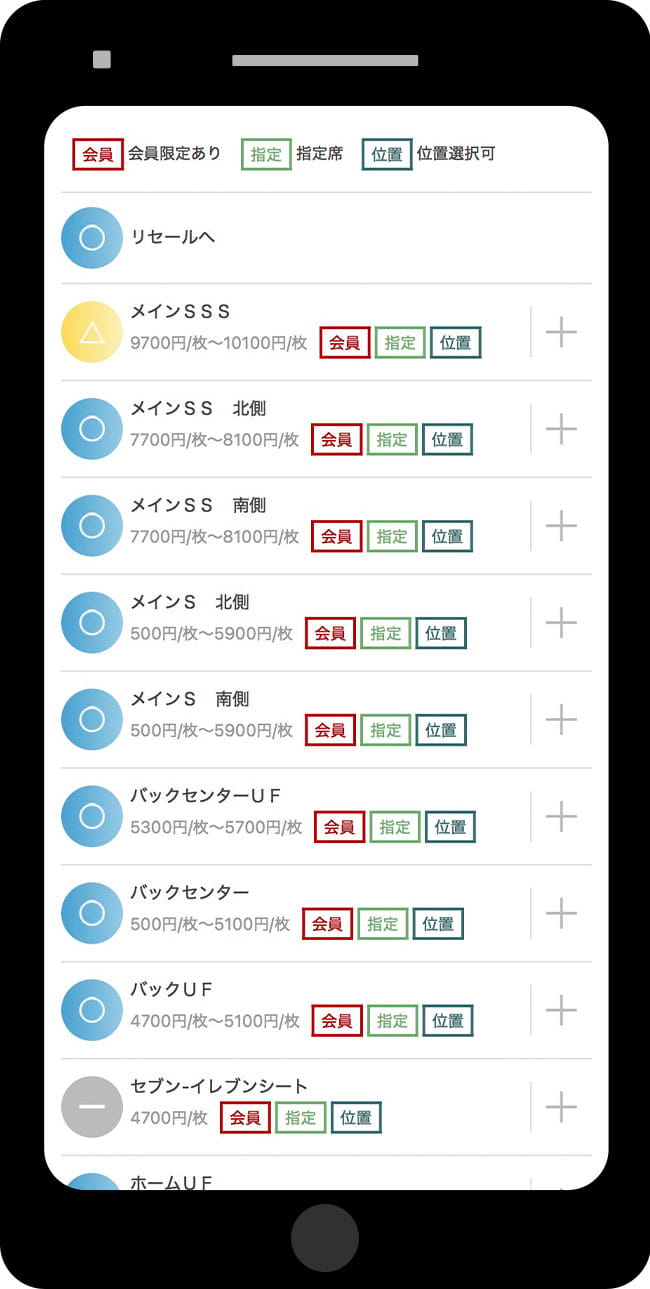
Please select your preferred seat type and proceed with the purchase.
-
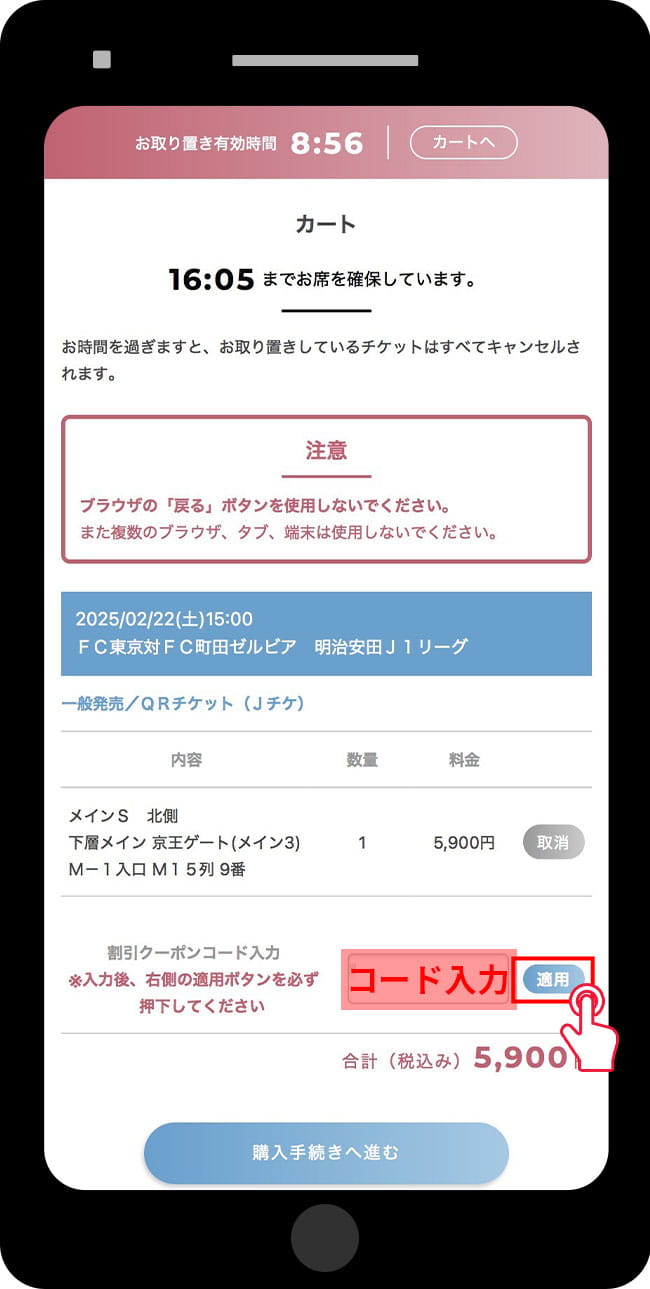
Please enter the discount coupon code (serial key) that has been provided and press "Apply".
-
Please confirm that the discount has been applied and proceed to complete your purchase.
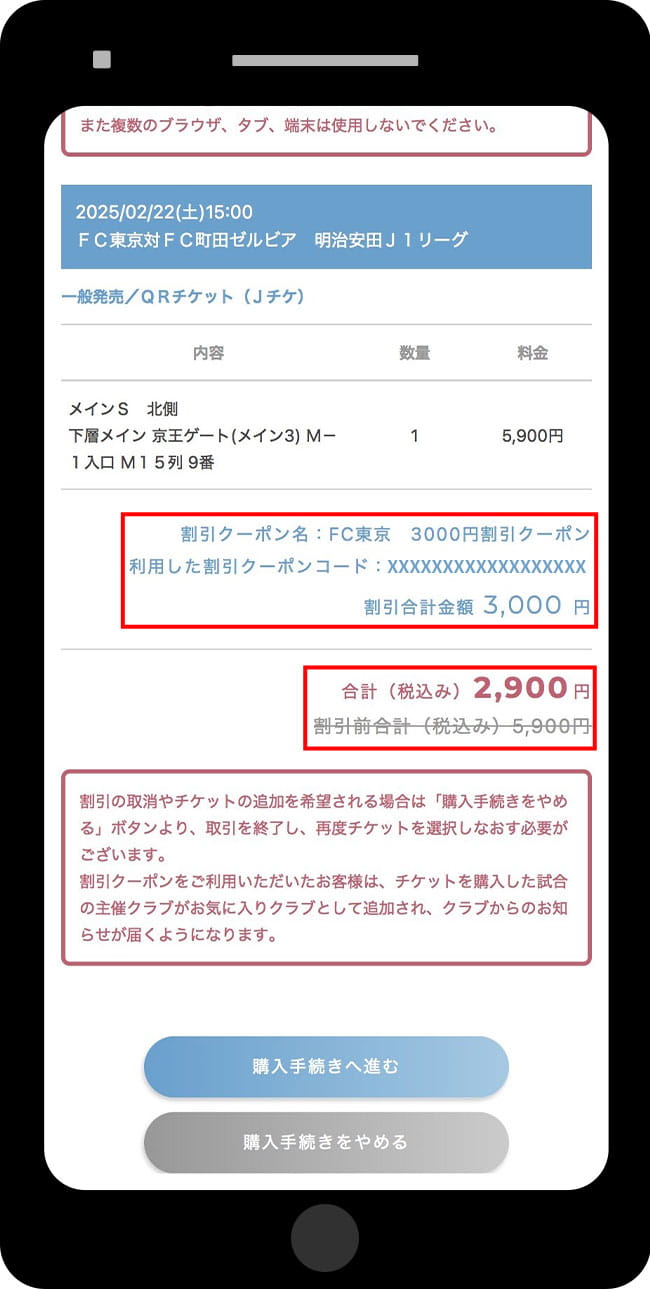
* The all-ticket-type invitation ticket applies to the highest-priced ticket at the time of payment.


Important Notes *Please be sure to read
- Discount coupon codes will be available for use starting from the advance sale for members.
- The target match will be an FC Tokyo home game.
- You can use one discount coupon code per transaction.
- If you want to cancel the applied discount coupon code, you need to stop the purchase process once and start over from the ticket selection.
- The discount coupon code for your application cannot be reissued.
- The matches eligible for the discount coupon code that you have applied for cannot be changed.
- After applying the discount coupon code, you cannot add another ticket to the cart. If you want to add another ticket, you need to cancel the purchase process and start over from the ticket selection.
- Discount coupons apply only to the ticket price, so various fees are not included.
- All ticket types are eligible for the invitation ticket, which will apply to the highest-priced ticket at the time of payment.
- When changing the reserved seat, the ticket fee payment will be the "amount for the new seat after the change" minus the "amount paid at the time of arranging the initially reserved seat." If you change the reserved seat using membership benefits such as ticket discount coupons or invitation tickets applicable to all ticket types, please note that the "amount paid at the time of arranging the initially reserved seat" does not include the discount amount, so the discount will not be deducted from the amount for the new seat after the change.
My Page
SOCIO/OFFICIAL MEMBERSHIP
-
Please access your My Page.
-
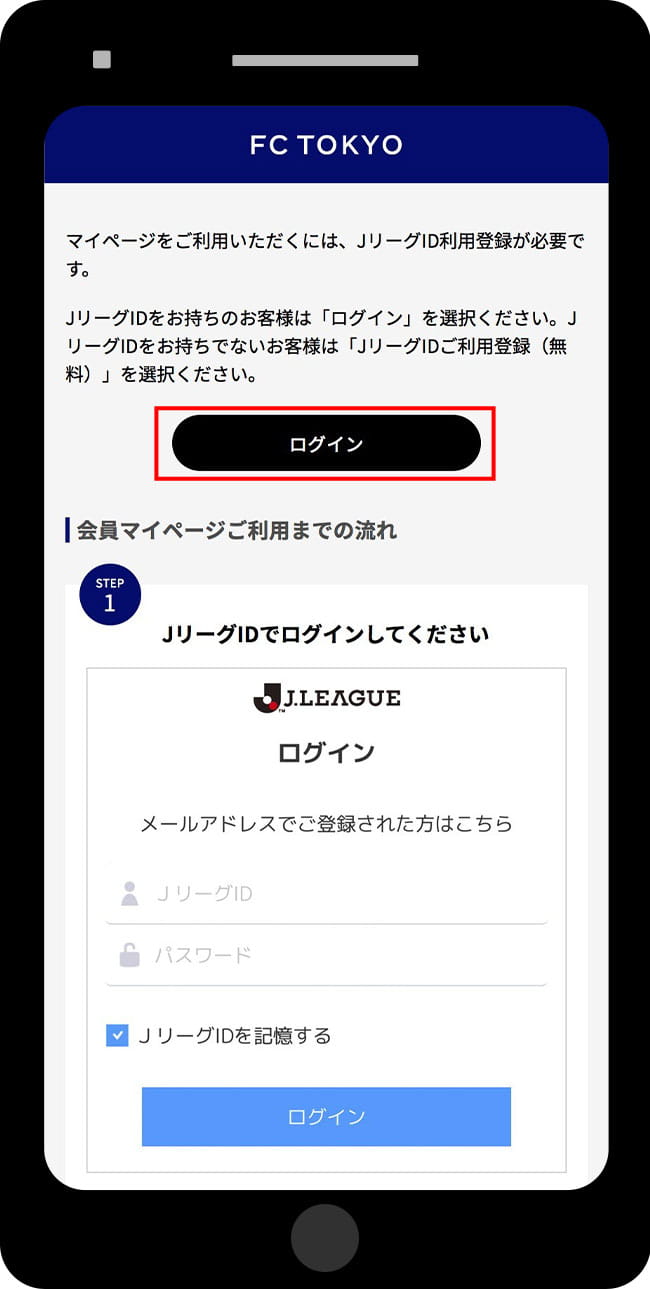
Please log in with the J.League ID you used when applying for SOCIO or OFFICIAL MEMBERSHIP.
-
Member information linked to the logged-in J League ID will be displayed.
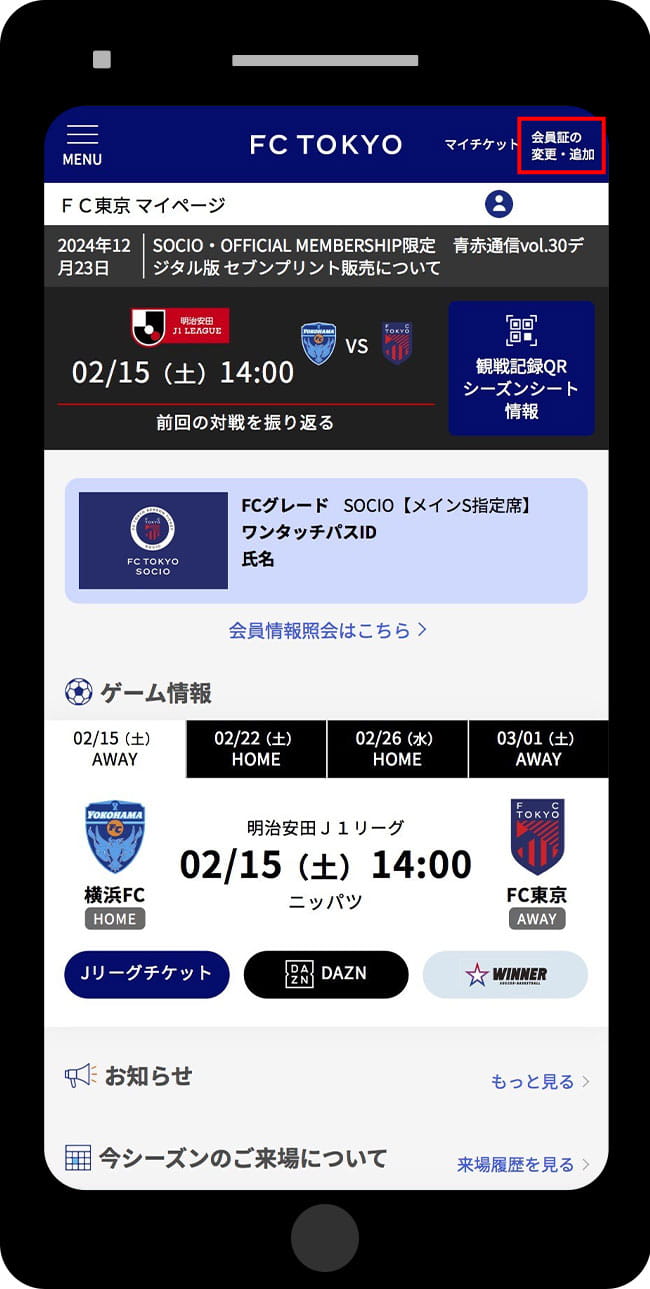


Display switching method when both SOCIO and OFFICIAL MEMBERSHIP are linked
-
Select "Change/Add Membership Card" in the upper right
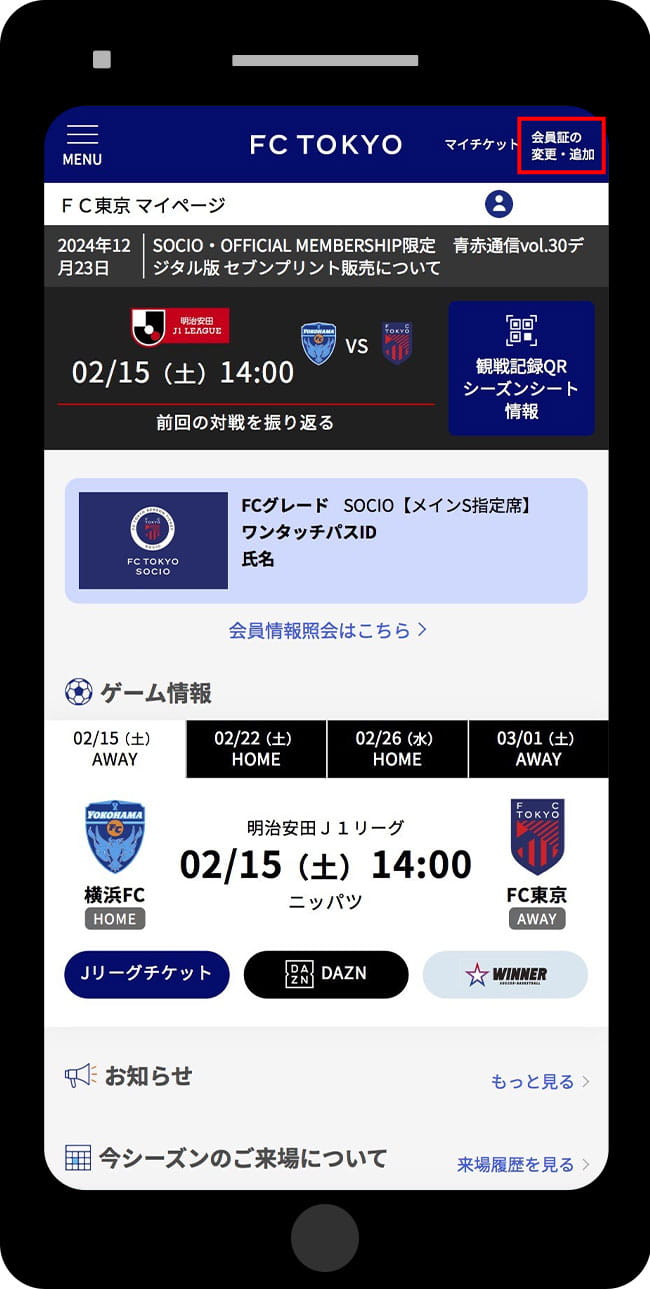
-
Select the membership card you want to display and choose 'Change Membership Card'
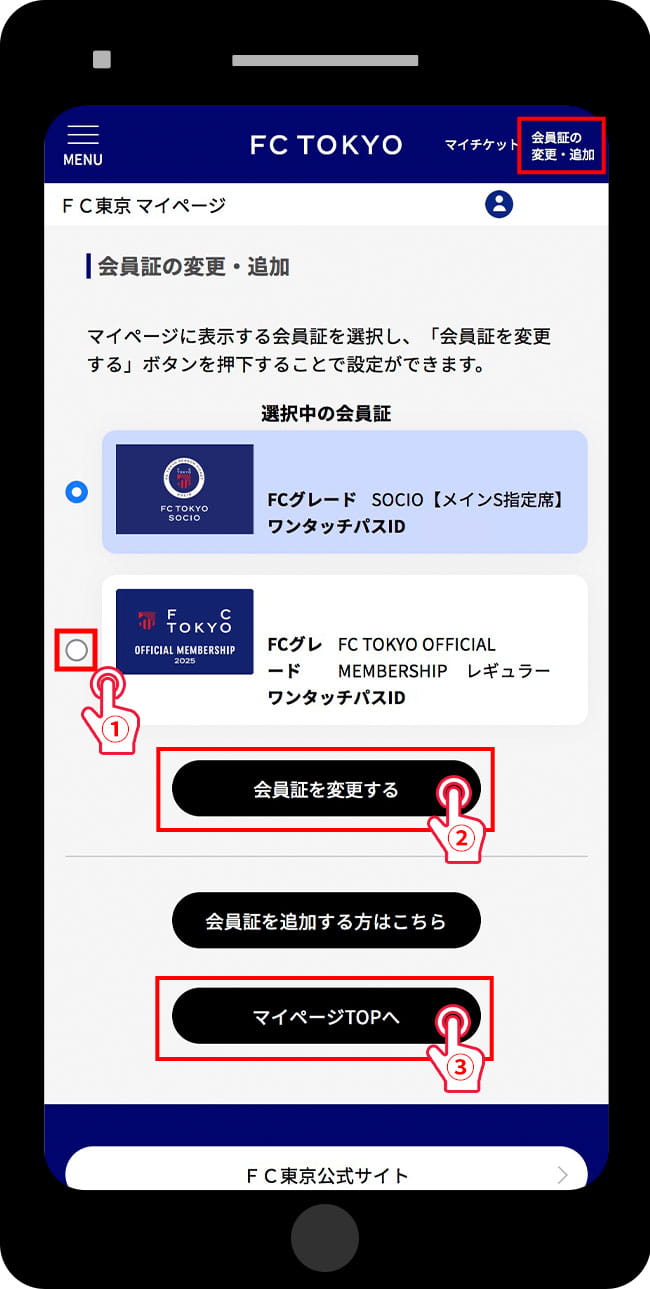
-
The card displayed when returning to the My Page top has been changed.
Only one SOCIO number and one OFFICIAL MEMBERSHIP membership number can be linked to a single J.League ID.


What you can do on My Page

-
The most recent match will be displayed.
-
You can display a QR code for match viewing records.
SOCIO members can check season seat information and seat numbers.
-
You can check your membership information.
For SOCIO members】You can check the number of continuous years, etc.
[For OFFICIAL MEMBERSHIP holders] You can check the serial numbers and other details of your benefit tickets. -
Upcoming match schedule will be displayed.
-
There may be announcements posted specifically for members.
There may be separate announcements for SOCIO and OFFICIAL MEMBERSHIP.
If both SOCIO and OFFICIAL MEMBERSHIP are linked, the default displayed member announcements will be shown. -
You can check attendance records for the past three years, including the 2023 season.
It may take several days to reflect your attendance history. Thank you for your understanding.
SOCIO・OFFICIAL MEMBERSHIP Common
| Item | Content |
|---|---|
| J.League Online Store Purchase History List | You can move to the J-League online shop and check your purchase history for goods. |
| J.League Ticket Purchase History List | Move to J.League Tickets to check your ticket purchase history and more |
| Change Basic Information | You can check/change your registered address and phone number. |
| Change Email Address | You can confirm/change your registered email address. |
| External Authentication Settings | You can configure integration settings with external services. |
| Change Favorite Club | You can confirm/change your favorite club registration. |